In this example we will create an environment for reinforcement learning based on the Chrono library. Specifically, we will create an environment that includes a differential drive system. Note that the model we will create will not be of high fidelity as the purpose of the example is show how to use Chrono to create reinforcement learning environments.
In order to be able to run this example you need to configure bitrl with Chrono support. You will also need the Irrlicht library for visualising the robot.
The following image shows an image of the environment we will create
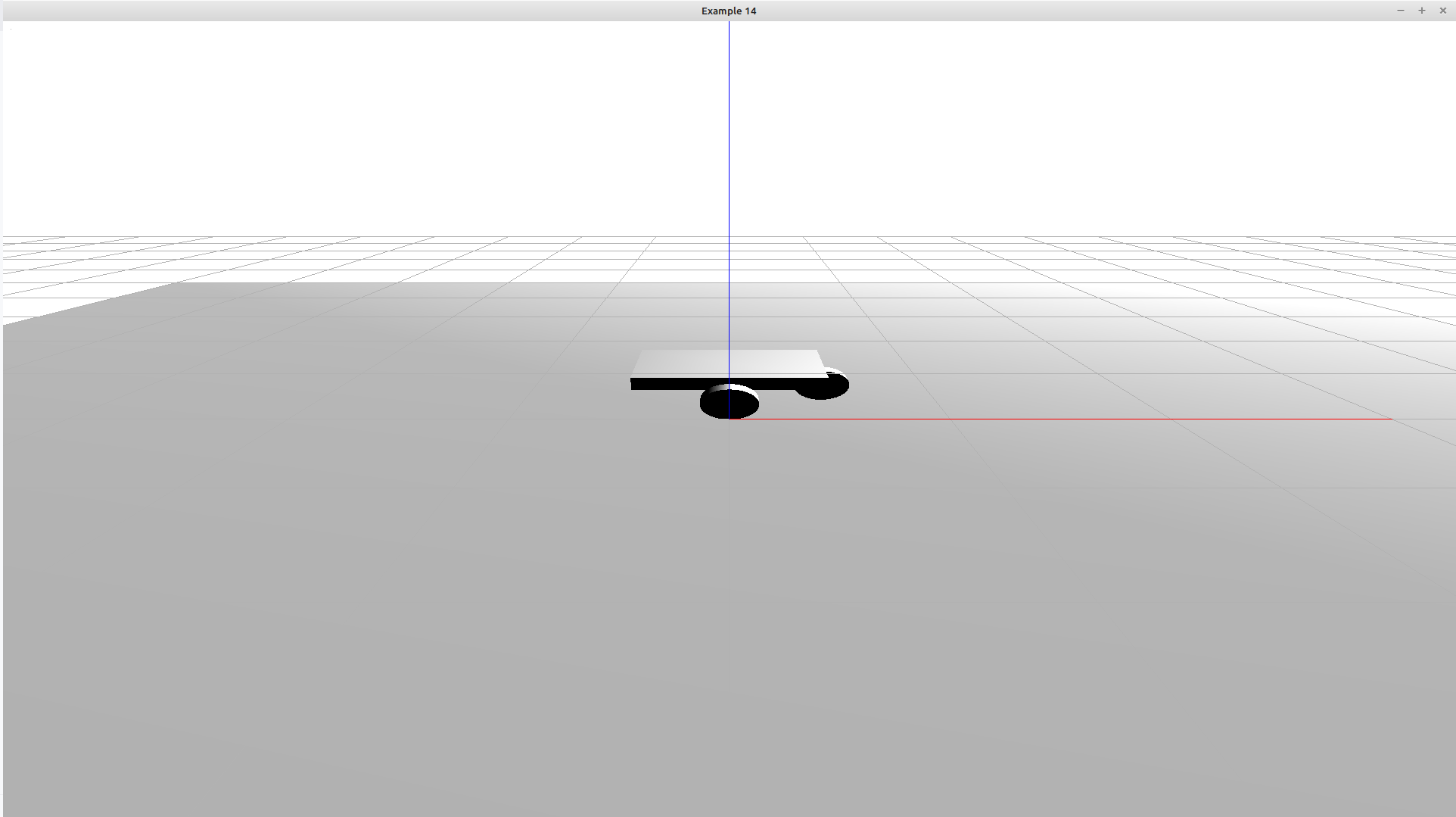
Below is the class that handles the robot model.
class DiffDriveRobot
{
public:
void add_to_sys(chrono::ChSystemSMC& sys);
void build();
void set_speed(real_t speed);
void reset();
bitrl::rb::bitrl_chrono::CHRONO_RobotPose& pose()noexcept{return pose_;}
private:
std::shared_ptr<chrono::ChBody> chassis_;
std::pair<std::shared_ptr<chrono::ChBody>, std::shared_ptr<chrono::ChBody>> wheels_;
std::shared_ptr<chrono::ChBody> caster_wheel_;
bitrl::rb::bitrl_chrono::CHRONO_RobotPose pose_;
};
The chassis of the robot is a simple rectangular plate. It also has three wheels. The model robot we will develop will not consider motors. However, Chrono allows for high fidelity models is this is needed. Below is the function that build the robot
void DiffDriveRobot::build()
{
chassis_ = chrono_types::make_shared<chrono::ChBody>();
chassis_->SetMass(1.0);
chassis_->SetPos(chrono::ChVector3d(0.0, 0.0, 0.22));
chassis_->SetFixed(false);
auto vis_shape = chrono_types::make_shared<chrono::ChVisualShapeBox>(
chrono::ChVector3d(0.4, 0.3, 0.05));
chassis_ -> AddVisualShape(vis_shape);
wheels_.first = build_wheel("left_wheel", 0.06, 0.05, chrono::ChVector3d(0.0, 0.175, 0.16));
wheels_.second = build_wheel("right_wheel", 0.06, 0.05, chrono::ChVector3d(0.0, -0.175, 0.16));
caster_wheel_ = build_wheel("caster_wheel", 0.06, 0.05, chrono::ChVector3d(0.2, 0.0, 0.16));
pose_.set_body(chassis_);
}
The reset function simple resets the robot to its original position
void
DiffDriveRobot::reset()
{
chassis_ -> SetPos(chrono::ChVector3d(0.0, 0.0, 0.22));
wheels_.first -> SetPos(chrono::ChVector3d(0.0, 0.175, 0.16));
wheels_.second -> SetPos(chrono::ChVector3d(0.0, -0.175, 0.16));
caster_wheel_ -> SetPos(chrono::ChVector3d(0.2, 0.0, 0.16));
}
Below are some helper functions for the robot.
void DiffDriveRobot::add_to_sys(chrono::ChSystemSMC& sys)
{
sys.Add(chassis_);
sys.Add(wheels_.first);
sys.Add(wheels_.second);
sys.Add(caster_wheel_);
}
void DiffDriveRobot::set_speed(real_t speed)
{
chassis_ -> SetAngVelLocal(chrono::VNULL);
chassis_ -> SetAngAccLocal(chrono::VNULL);
chassis_ -> SetLinVel(chrono::ChVector3d(speed, 0.0, 0.0));
wheels_.first -> SetLinVel(chrono::ChVector3d(speed, 0.0, 0.0));
wheels_.second -> SetLinVel(chrono::ChVector3d(speed, 0.0, 0.0));
caster_wheel_ -> SetLinVel(chrono::ChVector3d(speed, 0.0, 0.0));
}
Create the environment
The environment class inherits from the `bitrl::envs::EnvBase` class. We will need to specify the time step type and the space type:
constexpr uint_t STATE_SPACE_SIZE = 2;
constexpr uint_t ACTION_SPACE_SIZE = 1;
typedef TimeStep<chrono::ChVector3d> time_step_type;
Forward declaration.
Definition time_step.h:22
TimeStepTp
The TimeStepTp enum.
Definition time_step_type.h:16
Definition env_types.h:106
Here is the definition of the actual class.
{
public:
DiffDriveRobotEnv();
virtual void make(
const std::string &version,
const std::unordered_map<std::string, std::any> &make_options,
const std::unordered_map<std::string, std::any> &reset_options) override;
virtual void close()
override{}
virtual time_step_type
reset()
override;
virtual time_step_type
step(
const action_type &)
override;
void simulate();
private:
DiffDriveRobot robot_;
chrono::ChSystemSMC sys_;
uint_t sim_counter_{0};
void build_system_();
};
Base class interface for Reinforcement Learning environments.
Definition env_base.h:30
virtual time_step_type step(const action_type &action)=0
Perform one step in the environment using an action.
virtual void make(const std::string &version, const std::unordered_map< std::string, std::any > &make_options, const std::unordered_map< std::string, std::any > &reset_options)=0
Construct the environment instance.
Definition env_base.h:235
virtual time_step_type reset()=0
Reset the environment to an initial state using the reset options specified during make.
virtual void close()=0
Close and release any acquired environment resources.
Definition env_base.h:215
SpaceType::action_type action_type
Type representing an individual action.
Definition env_base.h:53
double real_t
real_t
Definition bitrl_types.h:23
Below are the implementations for reset, step and make
void
DiffDriveRobotEnv::make(const std::string &version,
const std::unordered_map<std::string, std::any> &make_options,
const std::unordered_map<std::string, std::any> &reset_options)
{
robot_.build();
build_system_();
robot_.add_to_sys(sys_);
this -> set_make_options_(make_options);
this -> set_reset_options_(reset_options);
this -> set_version_(version);
this -> make_created_();
}
time_step_type
DiffDriveRobotEnv::reset()
{
sim_counter_ = 1;
current_time_ = 0.0;
robot_.reset();
robot_.set_speed(15.0);
auto robot_position =robot_.pose().position();
return time_step_type(TimeStepTp::FIRST, 0.0, robot_position);
}
DiffDriveRobotEnv::step(const action_type &)
{
if (sim_counter_ % 100 == 0)
{
#ifdef BITRL_LOG
BOOST_LOG_TRIVIAL(info)<<"Reset simulation: ";
#endif
return reset();
}
sys_.DoStepDynamics(DT);
auto robot_position =robot_.pose().position();
sim_counter_++;
}
TimeStep< chrono::ChVector3d > time_step_type
Definition robot_env.h:29
float DT
Definition extended_kalman_filter.py:31
The simulate function wraps everything together
void DiffDriveRobotEnv::simulate()
{
chrono::irrlicht::ChVisualSystemIrrlicht visual;
visual.AttachSystem(&sys_);
visual.SetWindowSize(WINDOW_WIDTH, WINDOW_WIDTH);
visual.SetWindowTitle(WINDOW_TITLE);
visual.Initialize();
draw_world_axes(visual);
visual.AddLogo();
visual.AddSkyBox();
visual.AddCamera({0, -2, 1}, {0, 0, 0});
visual.AddTypicalLights();
visual.BindAll();
while (visual.Run())
{
visual.BeginScene();
visual.Render();
tools::drawGrid(&visual, 0.5, 0.5);
draw_world_axes(visual, 1.5);
auto time_step = step( action_type());
#ifdef BITRL_LOG
BOOST_LOG_TRIVIAL(info)<<"At time: "<<current_time_<<" position: "<<time_step.observation();
#endif
visual.EndScene();
}
}